


VIN Report for Used Cars
4.53.25K Reviews
App Specs
- Version
- 1.46
- Updated On
- License
- Free
- Downloads
- 500,000+
- Developer
- iSeeCars.com
- Categories
- Auto & Vehicles
- Platform
- Android
Screenshots
 Analysis by AppCompare
Buying a used car can turn a promising listing into a puzzle of paperwork, seller claims, and unanswered questions. I see VIN Report for Used Cars as a focused tool for one important part of that puzzle: checking a vehicle’s identification number before I get too attached to the deal. It is free to download, though in-app purchases are available, so I would treat it as a convenient starting point rather than assume every check is included at no cost.
Why the first search feels useful
The appeal is immediate when I have a specific car in mind. Instead of trying to remember which questions to ask a seller first, I can start with the VIN and use the report as a prompt for a more informed conversation. That can make a first viewing feel less like guesswork, especially if I am comparing several cars and need a consistent way to investigate each one.
A practical tip is to get the VIN directly from the vehicle as well as from the advertisement or seller. Comparing those details helps me avoid spending time on a report for a number that was mistyped or attached to the wrong listing. I would also keep the report beside the advertisement and note any claims that need follow-up, rather than treating a clean-looking result as proof that a car is mechanically sound.
Useful for a shortlist, not a final decision
This kind of VIN lookup is most valuable before a long drive to see a car or before I pay for an inspection. If the information raises questions, I can ask the seller about them before arranging a visit. If nothing concerning stands out, I still have a reason to check the car in person and arrange an independent mechanical inspection. A history report can inform that decision, but it cannot examine the engine, listen for unusual noises, or confirm how the car feels on the road.
That distinction matters because people often want a single yes-or-no answer when they are excited about a bargain. I would not use any report as a substitute for checking service paperwork, inspecting the body, taking a test drive, and having a qualified mechanic assess the vehicle. Its better role is to help me decide what to ask and whether it is sensible to take the next step.
Where it fits among other car-buying tools
Compared with searching a vehicle’s details manually or relying only on a seller’s explanation, a VIN report gives me a more structured place to begin. It is also more targeted than a general marketplace search: the point is to investigate a particular car, not to browse every available listing. For broad price comparisons, I would still look at similar cars in local listings; for mechanical certainty, I would choose an inspection. Those tools answer different questions, and using them together is more useful than asking one app to do everything.
Another trade-off is that a report is only as helpful as the records and details it can draw on. I would treat any result as evidence to weigh, not as a guarantee that every past event has been captured. If the seller’s story and the report do not line up, I would pause and ask for documentation instead of guessing which account is right.
Worth Reading Before You Choose

EA SPORTS FC Mobile 26 Is a Bigger Football Game, but It Takes Time

Flipboard Shows What News Apps Must Do Beyond the Feed

Switching to Android Auto Means Rethinking Your Driving Routine

Google Calendar Makes a Crowded Week Easier to Manage

Ludo King Makes the Most of the Minutes Between Plans

Baby Panda World Brings Quick Play to Modern Phones, but Its Game Library Feels Busy
Using the app as part of a buying routine
For me, the strongest case is not one dramatic search; it is a repeatable routine for evaluating cars. I would gather the VIN, check the report, write down follow-up questions, and then decide whether the car deserves a viewing or inspection. That small process helps keep enthusiasm from outrunning the evidence, particularly when a seller is asking for a quick decision.
A realistic viewing-day workflow
Imagine finding a used car that looks right in photos and is within budget. Before setting off, I would ask the seller for the VIN, check it against the listing, and review the report. If something needs explaining, I can raise it in a message or call rather than discovering the question after arriving. At the viewing, I would compare the vehicle with its paperwork and the seller’s account, then use any unresolved concerns to guide a mechanic’s inspection.
This workflow is especially handy when I am weighing two or three candidates. I can keep the same questions for each one—identity, history, paperwork, condition, and price—so a polished advertisement does not receive more trust than a less flashy but better-documented car. The report helps with only part of that comparison, but having that part organized can make the whole decision calmer.
What makes it worth revisiting
A car-shopping app may be most useful during a short buying window, not as something I open every week for years. The recurring value comes when I am checking multiple candidates, helping a family member assess a car, or returning to a saved set of questions before another viewing. Once I have bought a vehicle, the reason to keep using a VIN lookup may fade unless I am checking another car or helping someone else.
That makes the free download easy to consider, but I would pay attention to the purchase screen before ordering a report. In-app purchases range from $9.99 to $38.99 per item, so I would check what a particular purchase covers and whether it suits the car I am investigating. I would not assume that downloading the app means every detailed result is free, nor buy multiple checks without first understanding the available options.
Who will get the most from it
I think VIN Report for Used Cars is best for a cautious buyer who already has a specific vehicle to investigate and wants a simple phone-based first check. It can also help someone who is new to used-car shopping by giving them a concrete place to begin, as long as they understand that a report is not a verdict. The app is less compelling for someone who is only browsing casually, already has a trusted inspection process, or expects a VIN search to replace direct checks and professional advice.
It may also be the wrong choice when the immediate need is valuation rather than history, or when I need a hands-on assessment of condition. In those situations, comparing local listings or booking an independent mechanic is a better next move. I would use the report to narrow uncertainty, not to make a decision on its own.
Everyday friction and sensible expectations
The biggest practical limitation is that the quality of a decision still depends on what I do after reading. A report can raise a useful question, but I need the seller to respond and the paperwork or inspection to help resolve it. A result that seems reassuring may still leave questions about wear, repairs, or how the car has been maintained. That is why I would avoid using confident wording from any report as a reason to skip a test drive or inspection.
There is also a small habit cost: I need to obtain the correct VIN and make time to check the result before I get emotionally invested. That is not a major burden, but it works best when I do it early, while I am still comfortable walking away. If I wait until I am negotiating in person, I may feel pressure to overlook questions I would have taken seriously the day before.
What I would check before relying on a result
I would first make sure the VIN entered matches the vehicle and then compare the report with the seller’s paperwork and description. If a detail appears inconsistent, I would ask for an explanation and supporting documents rather than treating the mismatch as automatic proof of wrongdoing. If the answer is vague or the paperwork does not settle the issue, I would slow down or move on. This is a more useful way to handle a report than reading it as a simple pass-or-fail score.
I would also keep the report’s purpose narrow: it can inform the history side of my research, while a mechanic assesses present condition and a price comparison helps judge the asking amount. Bringing those perspectives together is less convenient than hoping for one perfect tool, but it gives me a stronger basis for a costly decision.
Verdict after the novelty wears off
The app’s appeal is practical rather than habit-forming. I would not expect a VIN checker to become a permanent part of my daily phone routine, but during a search for a used car, having a dedicated place to investigate a candidate can earn its space. Its value is highest when I check early, use the findings to ask specific questions, and stay willing to walk away if the answers do not add up.
VIN Report for Used Cars is made by iSeeCars.com and sits in the auto and vehicle category. It has a 4.5 average from around 6,200 ratings, with over 500,000 installs, and its content rating is Everyone. The app first arrived on March 14, 2017; version 1.46 supports devices running at least iOS 8.1. Those details make it a well-established option to consider, but they do not change the core advice: use a report as one layer of due diligence, not as a promise about a car’s condition.
My recommendation is simple: if I have a real candidate and its VIN, I would consider using the app to prepare for the next conversation or inspection. If I am expecting it to certify a car as safe, uncover every possible issue, or settle a dispute without paperwork and expert help, I would choose a different approach. Used-car decisions are rarely made by one search alone, and this tool makes the most sense when it helps me ask better questions and spend my time more carefully.
Have you ever been in the market for a used car and felt overwhelmed by the sheer number of choices and the potential pitfalls lurking behind each deal? Well, let me introduce you to VIN Report for Used Cars, a handy app that aims to make your car buying experience a whole lot smoother. I decided to take it for a spin, and here's my take on how it performs.
Getting Started with the VIN Lookup
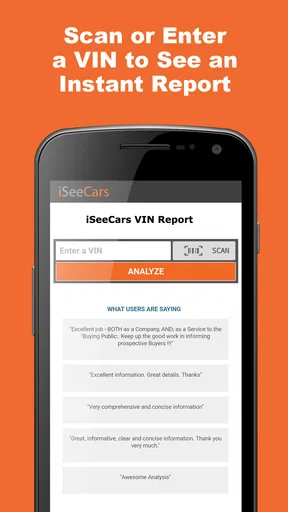
The first thing you'll notice about VIN Report for Used Cars is its straightforward design. When you open the app, you're greeted with a clean interface that prominently features a search bar for entering the Vehicle Identification Number (VIN). I appreciate this direct approach because, honestly, who has time to navigate through endless menus when you're eager to get the lowdown on a potential purchase?
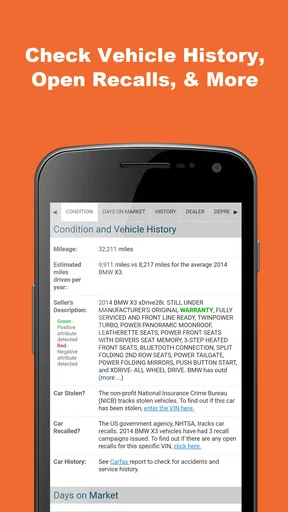
Entering a VIN is as simple as it gets. Once you input the number, the app works its magic, pulling up detailed information about the car's history. This includes everything from previous accidents to mileage records and even any recalls that might be associated with the vehicle. It’s like having a detective in your pocket!
Features That Stand Out
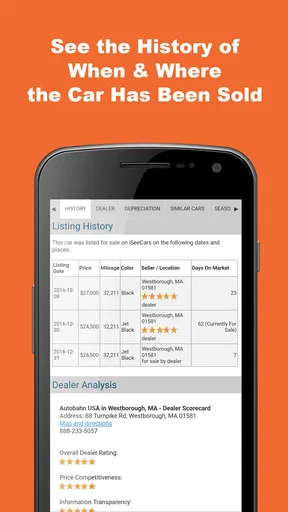
One of the standout features is the comprehensive vehicle history reports. These reports are quite detailed and provide a level of transparency that is often missing when buying used cars. I found it particularly useful to check for any hidden issues that the seller might not be upfront about.
Another cool addition is the maintenance schedule feature. This lets you know when the vehicle might need its next service, which is crucial for planning and budgeting. It’s like having a mini mechanic giving you advice on the go.
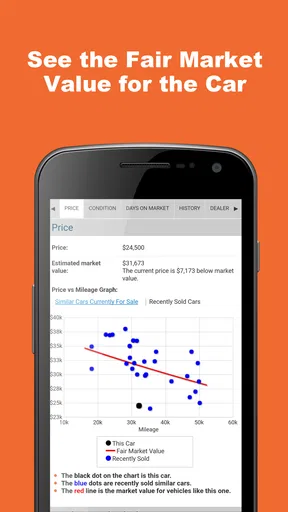
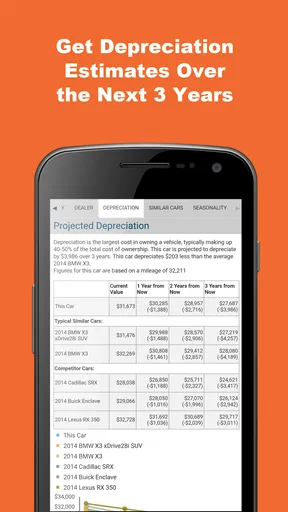
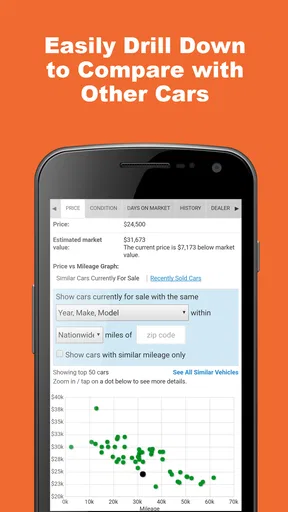
Moreover, the app offers a price analysis tool. This nifty feature helps you determine if the car is priced fairly based on its condition and market trends. It’s a great way to ensure you’re not overpaying, especially in today’s competitive auto market.
Using the App on the Go
What I really love about this app is how mobile-friendly it is. Whether you’re at a dealership or checking out a car from a private seller, you can whip out your phone and get all the information you need within minutes. The app’s responsiveness is impressive, making it a breeze to use even on older devices.
Plus, the app supports offline access to previously downloaded reports. This means you can review crucial information even in areas with spotty internet connectivity, which is a huge plus if you're checking out cars in more remote locations.
Security and Privacy
In today’s digital age, security is paramount, and the app doesn’t skimp on this front. Your searches and data are kept private, ensuring that your personal information isn’t shared with third parties. This is one less thing you have to worry about while making a potentially significant investment.
Final Thoughts
In conclusion, VIN Report for Used Cars has proven to be a valuable tool for anyone navigating the used car market. Its ease of use, coupled with the depth of information it provides, makes it an essential download for potential car buyers. While no app can replace a thorough mechanical inspection, this one certainly helps in making informed decisions and negotiating with confidence.
If you’re on the hunt for a used car, I’d recommend giving this app a shot. You might just find it’s the co-pilot you never knew you needed on your car-buying journey. Happy hunting!
Pros
- Comprehensive vehicle history reports.
- User-friendly interface and navigation.
- Quick report generation time.
- Includes accident and recall information.
- Supports multiple vehicle checks.
Cons
- Limited free features available.
- Occasional data accuracy issues.
- No offline access to reports.
- Requires account registration.
- Some info requires premium access.
FAQs for VIN Report for Used Cars
What information does the VIN Report for Used Cars app provide?
The VIN Report for Used Cars app provides comprehensive details about a vehicle’s history. This includes accident reports, previous ownership details, title status, mileage discrepancies, and recalls. It’s an essential tool for assessing the reliability and value of a used car before purchasing.
Is the VIN Report for Used Cars app free to use?
The app offers both free and premium features. While basic information about a vehicle can be accessed for free, more detailed reports, such as accident history and title checks, may require a one-time fee or subscription service. Check the app for the most current pricing details.
How accurate is the data provided by the VIN Report for Used Cars app?
The app sources its data from reputable national databases that track vehicle history. While it strives for accuracy, users should cross-check the information with official sources or a trusted mechanic, especially for critical decisions like purchasing a vehicle.
Can I use the VIN Report app for cars outside the United States?
The app primarily focuses on vehicles registered in the United States, as it relies on U.S. databases for its information. For international vehicles, the app may provide limited data. Users should verify coverage with the app’s support or documentation for specific countries.
What do I need to obtain a report from the VIN Report for Used Cars app?
To generate a report, you will need the vehicle's VIN (Vehicle Identification Number). This 17-character sequence can typically be found on the vehicle’s dashboard, driver's side door, or vehicle documents. Entering this into the app will allow you to access the vehicle’s history.


